CASE STUDY · DROPBOX · APP CENTER
Building a marketplace for
90,000 apps nobody could find
Dropbox had nearly a million registered developers and no central place for users to discover any of their apps. I led the content strategy that turned a fragmented ecosystem into a scalable, searchable platform — from defining what an "app" even meant, to launching a system that served 4.5 million visitors.
Content Design
\\\
B2B SaaS
\\\
Information Architecture
\\\
Ecosystem
\\\
Platform
\\\
Content Design \\\ B2B SaaS \\\ Information Architecture \\\ Ecosystem \\\ Platform \\\
My Role
Content Designer
Audience
Customers, Developers, Business Development
Team
Product, Eng, Biz Dev, Localization
Key Outcomes
Launched with 80+ listed apps
Support for 21 languages
4.5 million visitors first year
Surface
Web — Dropbox.com/apps
The problem
Dropbox had 900,000 registered developers, 90,000 apps calling its APIs, and no centralized place for users to discover any of them. The roughly 30 apps that did have entry points were scattered across the product — inconsistent UX, unpredictable placement, no educational context.
Users couldn't find apps. Developers couldn't drive traffic to them. And the technical foundation beneath it all was fragmented from years of individual teams building independently. Before a single screen could be designed, the most basic question needed answering: what should count as an "app"?
What I owned
Specific Contributions
I was the lead content designer across the full initiative — from leading the UX and technical audit that defined the product's foundational taxonomy, through designing the CTA framework, writing all UI copy across app types and flows, building the Airtable based content management system, and establishing cross-functional alignment infrastructure that kept 6+ teams coordinated across two years.
I partnered with product design, engineering, business development, localization, legal, and product counsel. Several of my content decisions — including the "Connect" CTA strategy and the definition of what qualified as an app — directly shaped product architecture decisions, not just surface copy.
The outcome
App Center launched in June 2020 and became the foundation for app discovery, usage, and management at Dropbox scale.
↑
4.5M Unique visitors
↑
175K Weekly visitors avg
↑
500+ Daily app connections
↑
80+ Apps at launch (2x goal)
↑ 4.5M Unique visitors ↑ 175K Weekly visitors avg ↑ 500+ Daily app connections ↑ 80+ Apps at launch (2x goal)
Listing time dropped from 2 months of synchronous EPD and BD work to 1 week for EPD and 4 weeks for BD. Years of UX and backend inconsistencies were resolved by moving apps to a new install framework with scalable entry points and settings.
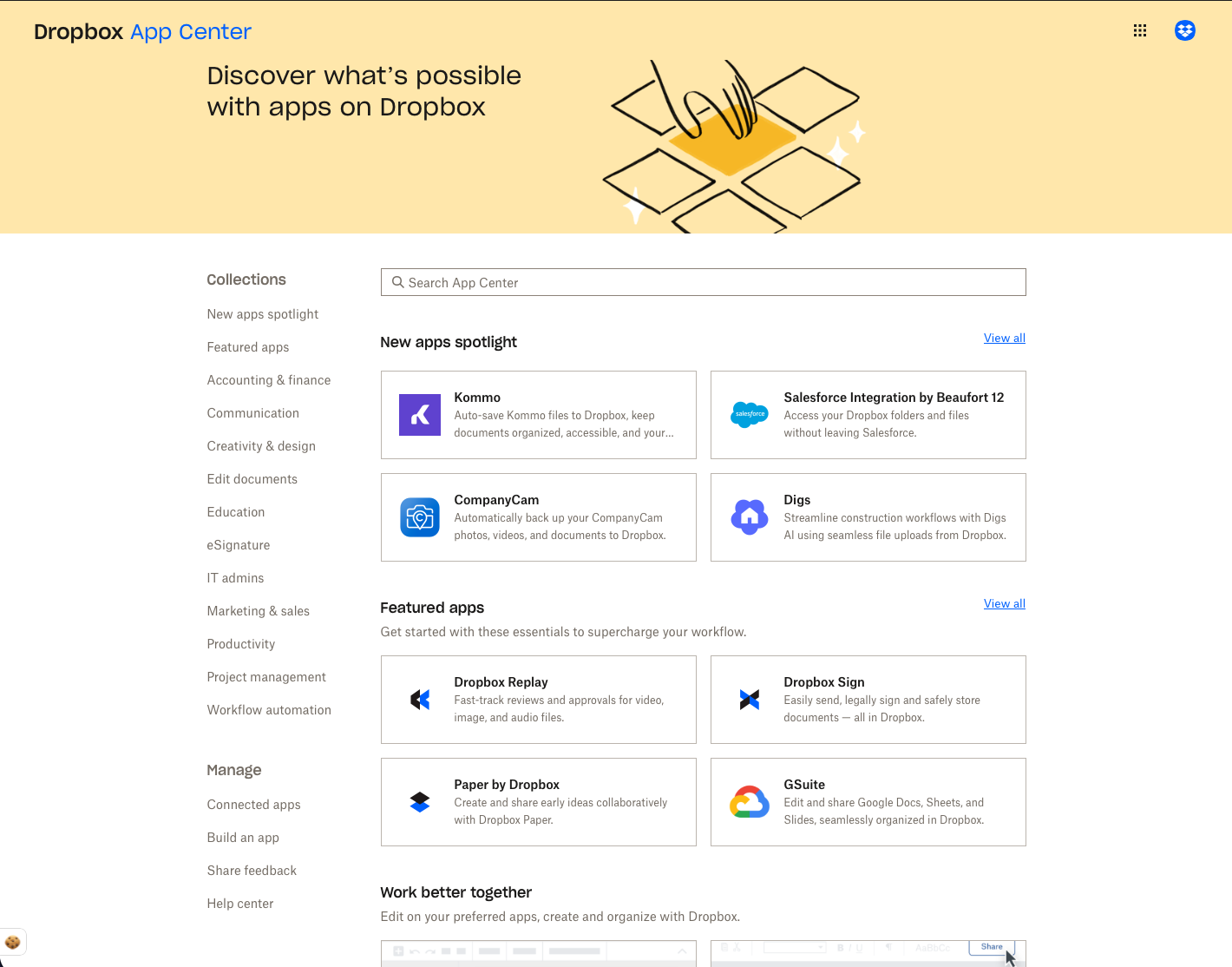
Screenshot of the view above the fold of the Dropbox App Center landing page experience. Collections are navigated by selecting thematic names on the left column, while the main content of the page highlights the newest apps along with some featured first and third-party apps.
-
Defining the taxonomy · Designing the CTA framework · Building the content system
The work spanned five distinct content design problems, each one a prerequisite for the next:
01 Defining "what is an app?"
Before writing a word of UI copy, I led a UX and technical audit to answer this deceptively hard question. Dropbox's business goals included first-party features and non-installable integrations — but users expected third-party, installable apps. Through research and stakeholder alignment, I established a clear framework: apps must be third-party and/or installable. This decision shaped the entire IA.
02 Unifying installation language across wildly different app types
Deep integrations, extensions, cloud docs, and API-only apps each had completely different technical installation models. I designed a content framework that abstracted these differences into a consistent mental model. "Connect" became the primary CTA — flexible enough to cover all scenarios, while research showed users looked for action-oriented verbs like "install" or "add."
03 Mapping four app types to one unified flow
I mapped each app type to a unified entry point that branched appropriately — auth screens, onboarding modals, or third-party redirects — depending on the app's technical model. This required modular content that worked across all variations while remaining specific enough to be useful in each.
04 Designing the collections content model
I designed the content architecture for collections — curated groupings organised by job-to-be-done, file type, or developer suite. These flexible containers let EPD, Marketing, and Biz Dev teams run experiments and create promotions for product launches without engineering support.
05 Building the content management system
I led the creation of an App Content Airtable that served as the source of truth for all app information across 21 languages. It gave teams a birds-eye view to predict issues, preview outcomes, and make faster decisions — and was designed to evolve into a self-serve internal console.
-
Competing stakeholder goals · Drawing the line on what counts as an app
The hardest content problem was also a product problem: Dropbox wanted to include first-party features and non-installable integrations in the App Center to hit volume and business goals. Users expected third-party, installable apps. Including both without a clear distinction would have created a surface that was confusing by design.
If we included everything Dropbox called an "app," users would arrive expecting a marketplace and find a feature list.
I developed a clear framework — apps must be third-party and/or installable — and used it to align stakeholders across EPD, Marketing, and Biz Dev. This wasn't just a content decision; it became the IA decision that determined what got listed, how it was categorised, and what the surface promised users.
The second major challenge was the "Connect" CTA itself. Research showed users looked for "install" or "add" — but those verbs didn't work across all technical app types. "Connect" was a content compromise that required careful surrounding copy to make the action feel concrete and accurate in every context.
-
Platform thinking · Content flexibility · Long-term perspective
Design for content flexibility, not wireframes. Designing the collections model as a flexible container — rather than a fixed layout — meant teams could experiment, promote, and curate without engineering dependency. Content architecture that anticipates change is more valuable than content that fits the current design.Develop a strong point of view when stakeholders diverge. With competing interests across EPD, Marketing, Biz Dev, Legal, and Localization, the worst outcome would have been a compromise surface that served no one clearly. Having a defensible content framework — and being willing to hold the line on it — was what enabled alignment, not prevented it.
Take the long-term, platform perspective. The Airtable content system was built as a stopgap — but it was designed with future self-serve and automation in mind. Thinking about where the system needs to go, not just where it is today, is what made it genuinely scalable rather than just functional.
-
From static curation to an intelligent, self-maintaining ecosystem
App Center was built in a pre-AI world where discovery depended entirely on manual curation and content management. AI could transform every layer — from how apps are discovered, to how the system maintains itself.
✦ Workflow-aware app recommendations
Instead of curated collections, an AI system could analyse each user's patterns — file types, existing tools, collaboration habits — and surface apps contextually. A user who frequently converts PDFs and shares with external partners might see Smallpdf and DocuSign at the moment they need them, not in a browse page they never visit.
✦ Intelligent content ingest at scale
The Airtable system was a smart stopgap — but AI could automate the full listing pipeline. An LLM could draft app descriptions from developer-submitted materials, flag quality issues, generate localised versions across all 21 languages, and maintain voice consistency — reducing listing time from weeks to hours.
✦ Conversational app discovery
Rather than browsing categories, users could describe what they need: "I need to sign contracts and send them to clients without leaving Dropbox." An AI assistant could interpret intent, recommend the right app, and walk the user through the connection flow conversationally.
✦ Dynamic collection curation
AI could generate and maintain collections based on trending usage, seasonal needs, or emerging integrations — "Apps your team is using this month," "New integrations for tax season" — all without manual curation overhead.
✦ Predictive content health monitoring
AI could monitor app listing quality over time, flag stale descriptions, detect broken integrations before users encounter them, and proactively notify BD teams when partner content needs updating — turning a reactive content ops task into a proactive one.